Row-Level Security with Composable Data Sources
The facility data in this post is made up, and the emails on screen are aliased to example.com. The technique is real.
Composable Data Sources are here!!!
Composable data sources (CDS) are a way for us to model data using published data sources. This opens up a bunch of different use cases, but the one I'm most excited about is row-level security (RLS).
Row-level security has always been possible in Tableau. It's just always been tricky.
Now with composable data sources it's much easier. Before, you either rebuilt the security logic in every workbook or bolted your entitlement table onto one big data source and lived with the compromises. Now you write the logic once, in a published entitlement table, and plug it into the data sources that need it.
What is row-level security?
Row-level security (RLS) controls which of your users can see what data, at the most granular level there is: the row. Not the dashboard. Not the worksheet. The data source.
The goal is that you build one dashboard, and it adapts based on who is looking at it.
To make that work, you need two things.
-
The first is your data. In my example, it's a pretty typical facility clinical outcomes table, where each row is one facility, one month and one outcome, like hospitalizations or missed treatments.
-
The second is the star of the show, the secret sauce: an entitlement table. It's a slim data source, just a couple of columns, with one row for every user and every facility they're allowed to see.
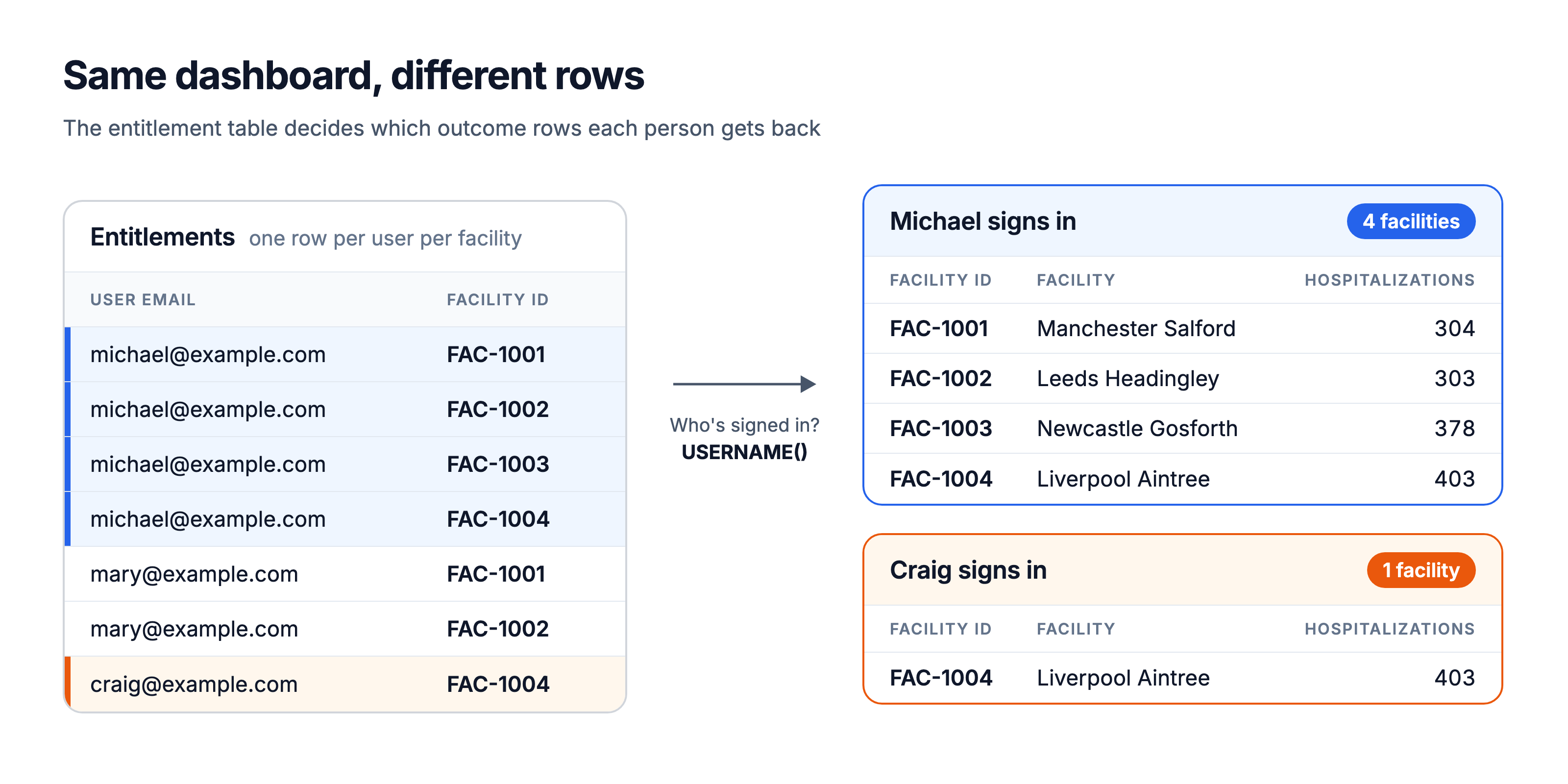
Same data source, same dashboard. Who is signed in decides which rows come back.
That's row-level security. And it goes beyond filtering, which I'll come back to in step 4.
Adding RLS with CDS
The recipe is two published data sources, one relationship and one data source filter.
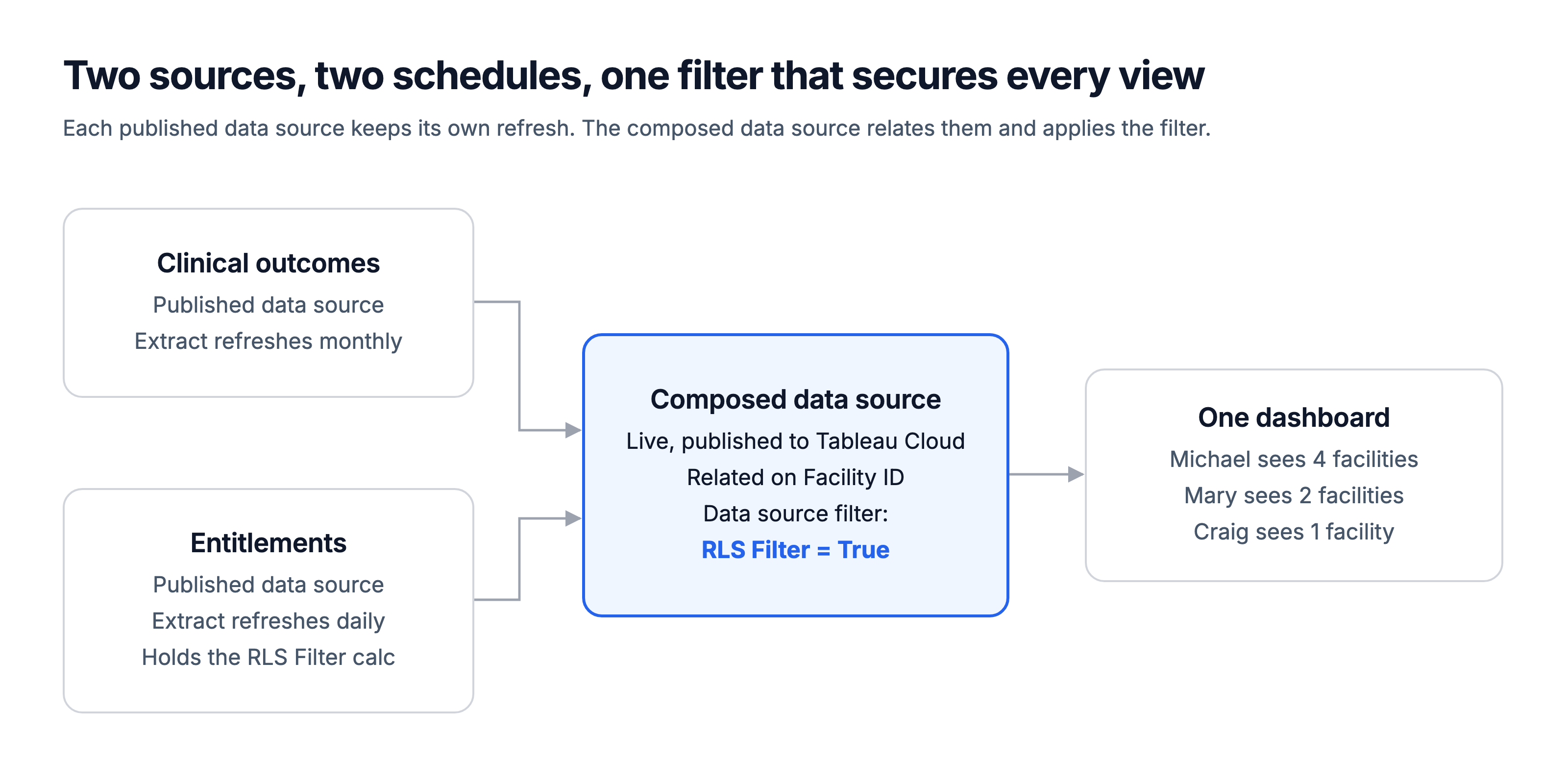
Two published data sources, two refresh schedules, one filter
If you've built a relationship model in Tableau before, most of this will feel familiar.
1. Publish or connect to the data table you want to secure
It should be a published data source. Publish your outcomes table to Tableau Cloud as its own data source, and set its refresh schedule to match the data. Mine refreshes monthly.
2. Publish your entitlement table, with the RLS calculation
Build and publish the entitlement table as a second data source and set it to refresh daily. Access changes every day as people join, move and leave.
Before you publish it, add the calculation that does all the work. I call it RLS Filter:
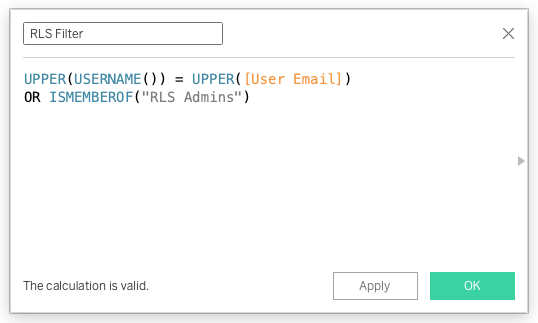
Just the calculation for now. No need to actually do anything with the filter yet.
USERNAME() returns whoever is signed in. On Tableau Cloud, that's the email address you sign in with.
Wrapping both sides in UPPER() takes case out of the equation. The ISMEMBEROF line is optional, and I'll explain it below.
The beauty of putting the calculation here is that you only write it once. Every composed data source that uses this entitlement table picks it up, instead of you recreating it in every single workbook. In my demo, one entitlement table secures two composed data sources: Facility Outcomes and Facility Operations.
Test the calculation before you publish. Put User Email, Facility ID and RLS Filter on a sheet, then use the user menu in the status bar (Tableau calls it Filter as User) to switch between people. Only that person's rows should flip to True.
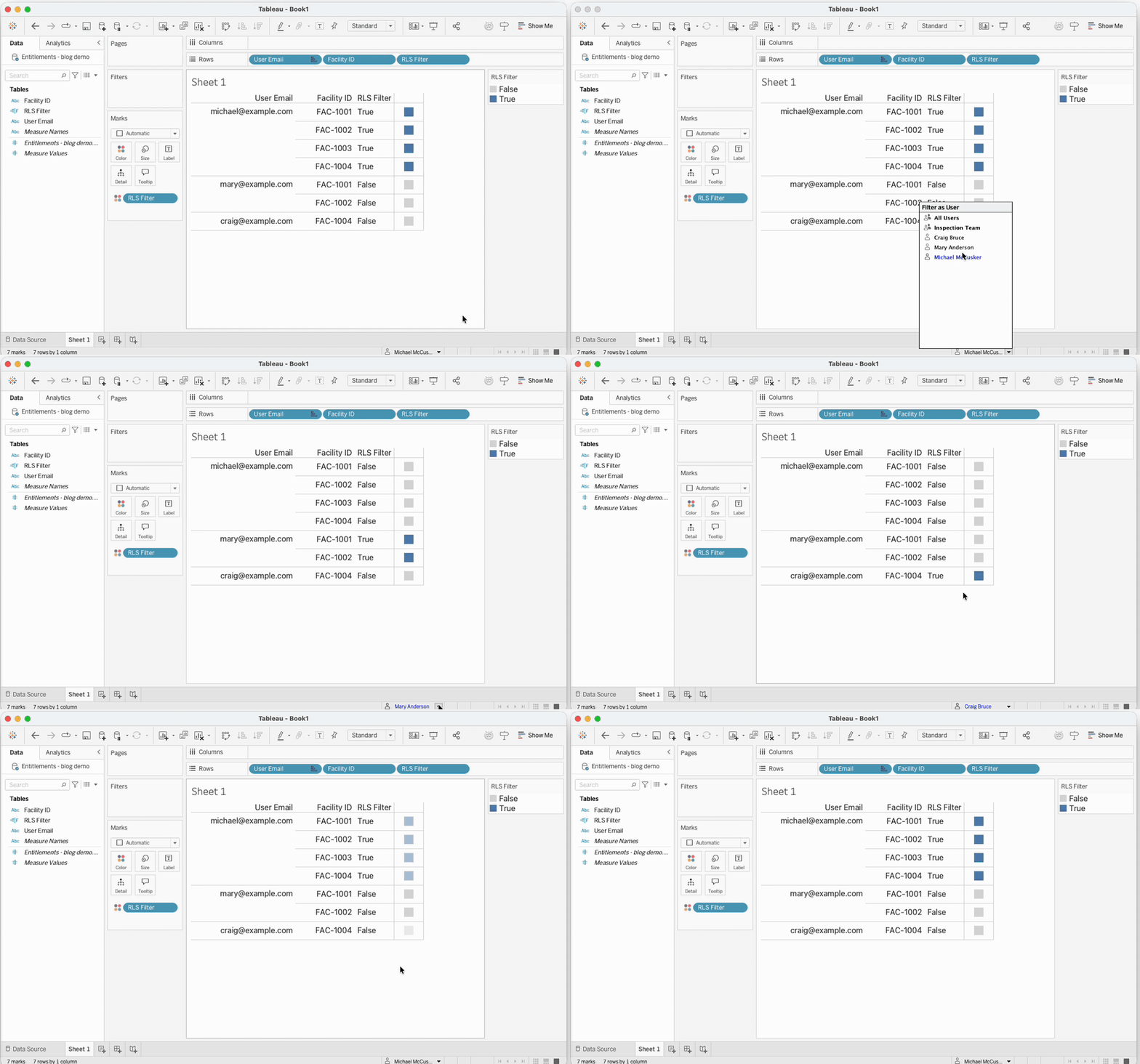
Filter as User, before publishing: each person's rows flip to True in turn.
This mimic user feature in Tableau Desktop is one of my favorites. If everything is working as expected, publish this data source.
3. Compose your secure data source
On Tableau Cloud or Desktop, connect to your outcomes table. Since Tableau 2026.2 there's a new button on the screen, Add Published Data Source. Click it to bring in your entitlements table.
Then you relate the two tables the same way we have done for ages using relationships in Tableau. Pull out a noodle, connect the two and set the relationship conditions.
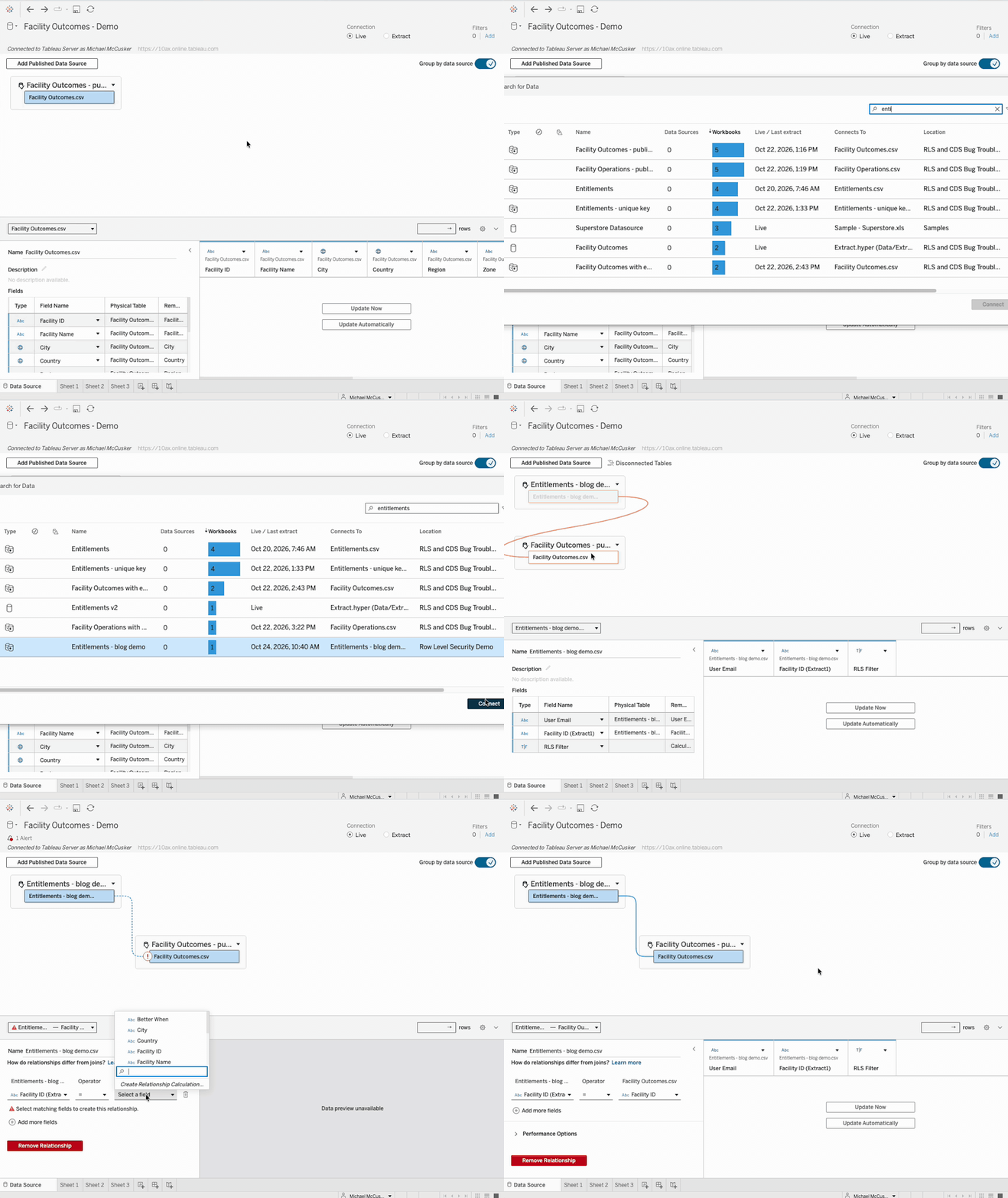
Add the entitlement table, drag it onto the outcomes table, then match Facility ID on both sides.
4. Add the RLS filter to the composed data source
Now, this bit is very important.
While you're still on the composed data source's Data Source page, click Add under Filters in the top-right corner, add RLS Filter and set it to True. You can also right-click the data source in the Data pane and pick Edit Data Source Filters.
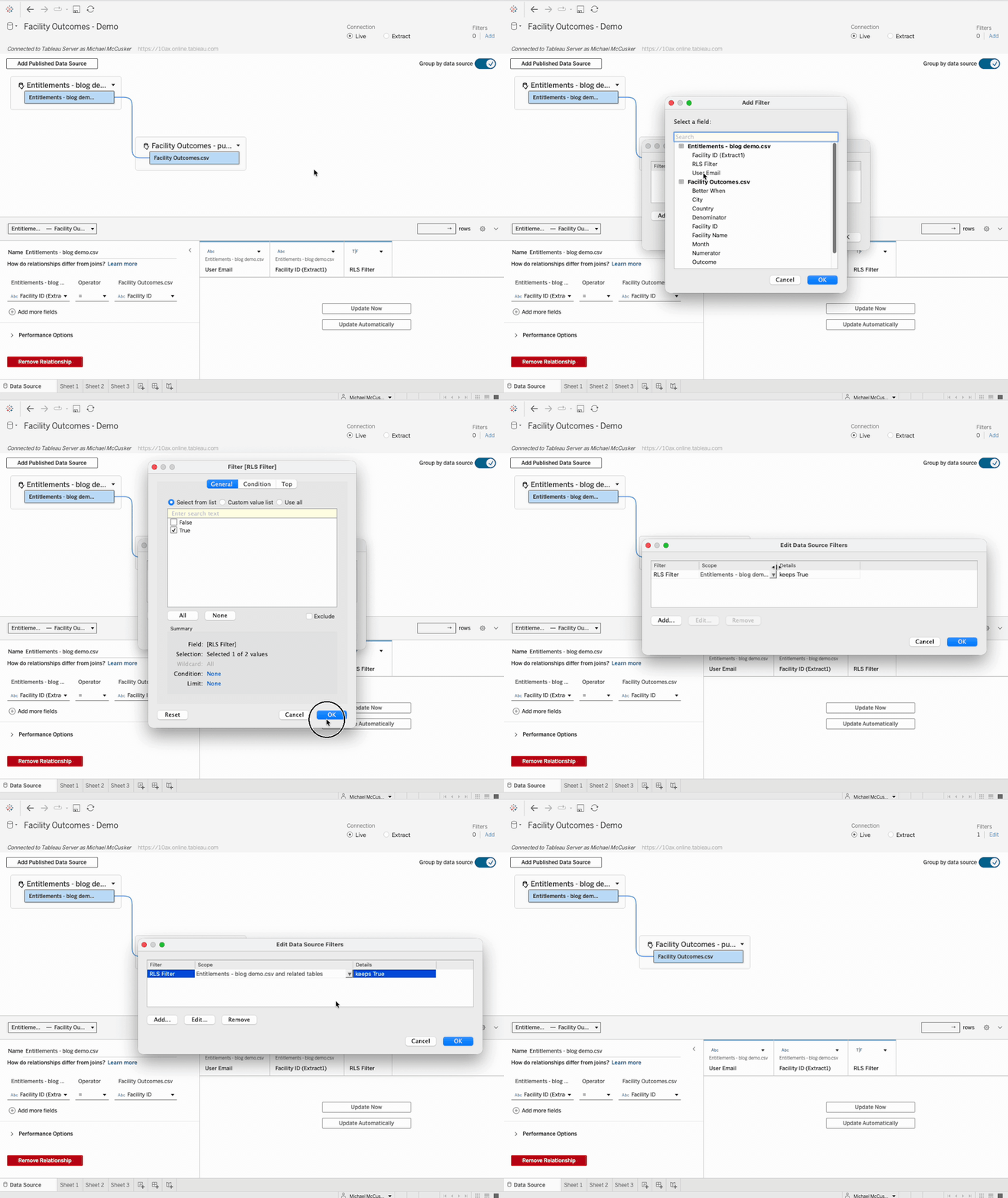
Add RLS Filter, keep True, then change its scope.
Then check one setting that's easy to miss. Tableau scoped my filter to the entitlement table alone by default. In Edit Data Source Filters, change the filter's Scope to your entitlement table and related tables, so the filter reaches the outcomes table too.
Put it here, on the composed data source, and not on the entitlement table you published in step 2. Don't make my mistakes. I tried it the other way and hit two problems:
-
All 100 facilities came back. A relationship only queries the tables a view uses, so a sheet built from outcome fields alone skipped the entitlement table and its filter.
-
Everyone else saw nothing. I'd published the entitlement table as an extract, so Tableau applied the filter while building the extract, as me, and kept only my rows.
Filtering is not RLS
Don't put it on a worksheet's Filters shelf either. It works, and the view drops to just the right facilities, but that's filtering, not row-level security. Anyone who can edit the workbook can remove a worksheet filter, and anyone allowed to download the data can walk right around it. A data source filter applies before the data reaches the dashboard, so the rows a user isn't entitled to never reach them.
Once you're happy, test it on Desktop.
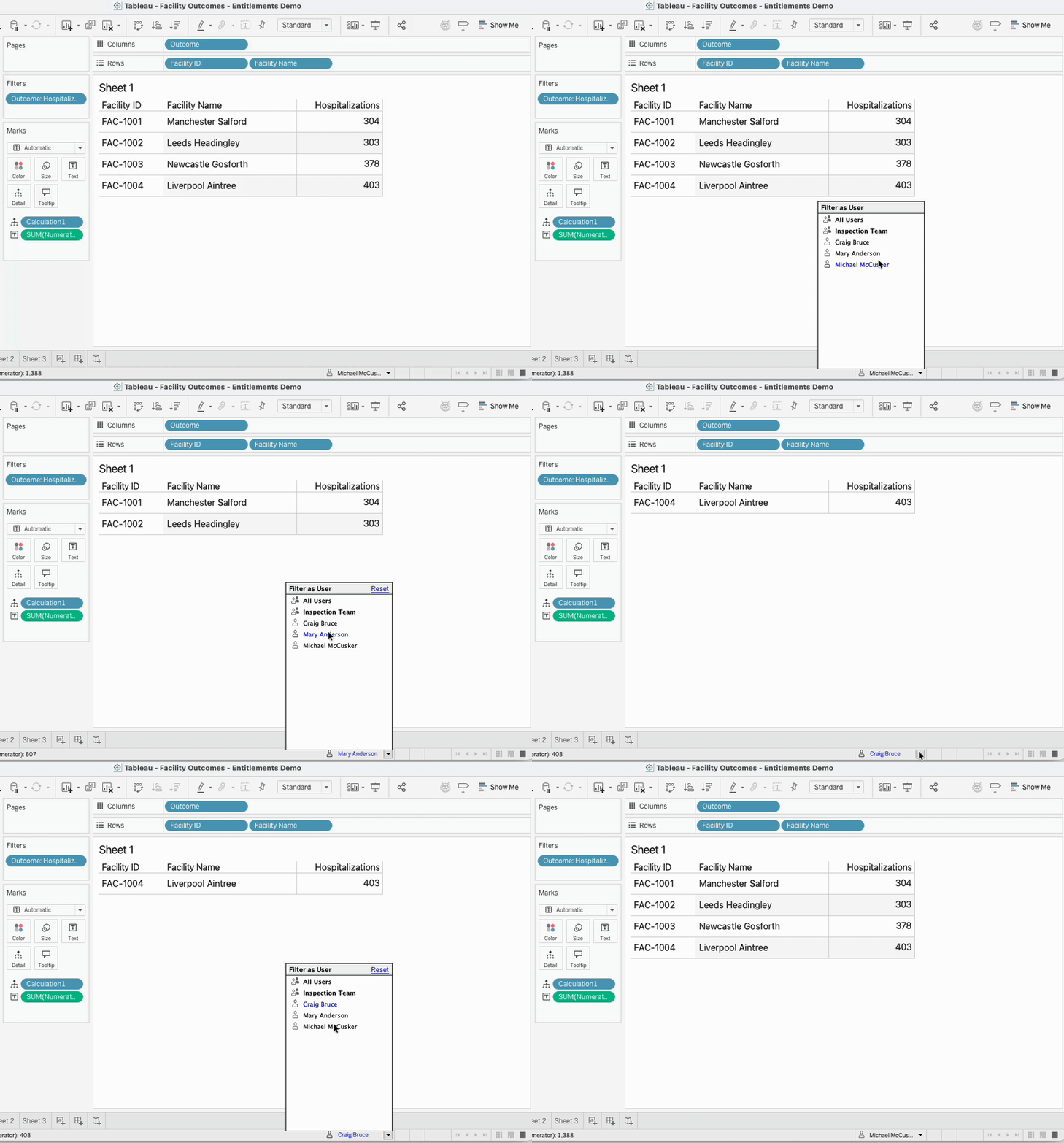
Filter as User on the composed data source: Michael, then Mary, then Craig.
5. Pick a path: published or embedded
From here, you have two paths. Both apply the filter, and the right one depends on your setup and your user base.
-
Publish the composed data source (Tableau's recommendation): you set the filter once, every workbook that connects to it gets it, and none of them can see or remove it. The trade-off is one more published data source to manage. In Tableau 2026.2, only live composed data sources can be published. That's fine: the two sources underneath keep their own extracts and their own refresh schedules.
-
Keep it embedded in the workbook: less to manage and easier to maintain, because everything lives in one workbook. But it's not as secure. The filter is saved in the workbook, so anyone who can edit that workbook can open the data source and delete it.
If everyone who can edit the workbook is already allowed to see all of the data, embedded is fine. If lots of people can edit it, publish.
Either way, test it. Sign in to Tableau Cloud as a real, non-admin test user (a private browser window works) and check that only their facilities come back. Signed in as Craig, that should be Liverpool Aintree and nothing else.
That's it. That's all it takes.
A few things to watch for
-
If you're not in the entitlement table, you see nothing. That's the right default for secure data, but it will catch you out as a developer. That's what the
ISMEMBEROFline is for: put your developers and admins in a Tableau group, rather than hard-coding your own email. Group changes only apply to new sessions, so sign out and back in after adding someone. -
Usernames have to match. The emails in the entitlement table have to match what people sign in to Tableau Cloud with.
UPPER()handles case. It won't fix a typo. -
Lock down the data sources underneath. Anyone using a composed data source needs access to every published data source inside it. Make sure that access doesn't let someone connect straight to the raw outcomes data source and skip your filter. Keep the raw sources somewhere locked down, and try it with a non-admin account before you go live.
-
It's not quite an inner join. If you speak SQL, a relationship behaves a lot like an inner join here, but not exactly: Tableau picks the join for each view. Because the data source filter always uses the entitlement table, every query has to bring it in, and that's what keeps the rows filtered.
Why not just one relationship model?
You could build this using relationships, so why bother with composable data sources?
Two main reasons:
-
Refresh trap
-
Locked box
The refresh trap. A good entitlement table updates daily. It's centrally owned, probably by IT, and every day users get added and removed as their permissions change. My outcomes table updates monthly. Publish them as one data source, and the two are locked to the same schedule.
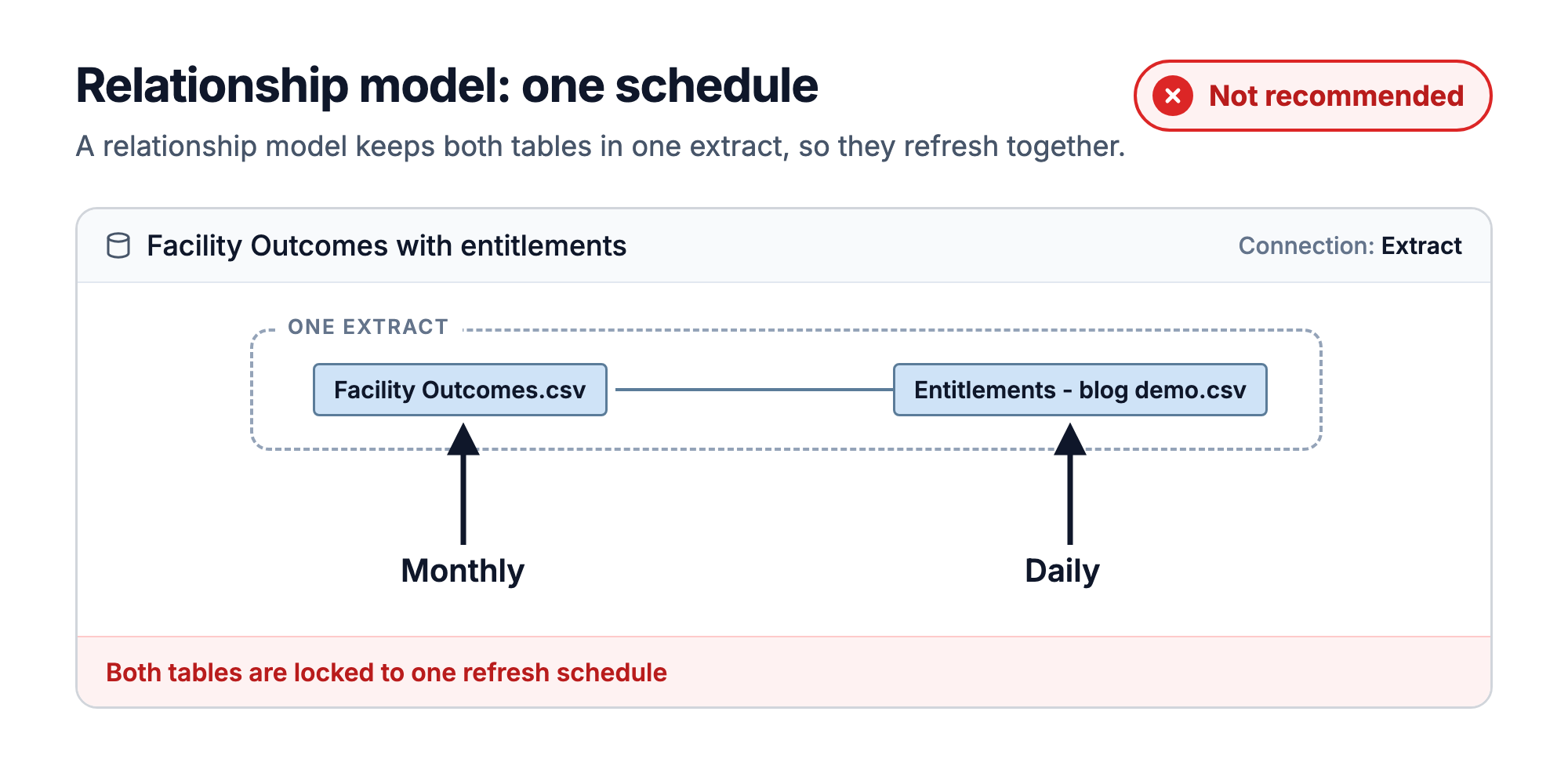
One extract, one schedule, two tables that need different ones.
Above, my two tables should have different refresh cadences: monthly and daily. But if you lock them together into a relationship model, they have to share a schedule. You could:
-
Update both monthly (entitlement table becomes stale)
-
Update both daily (waste of resources)
Your outcomes table is far, far bigger than a two-column entitlement table. Running it 30 times a month, when 29 of those runs do absolutely nothing, costs a lot of time, compute and money.
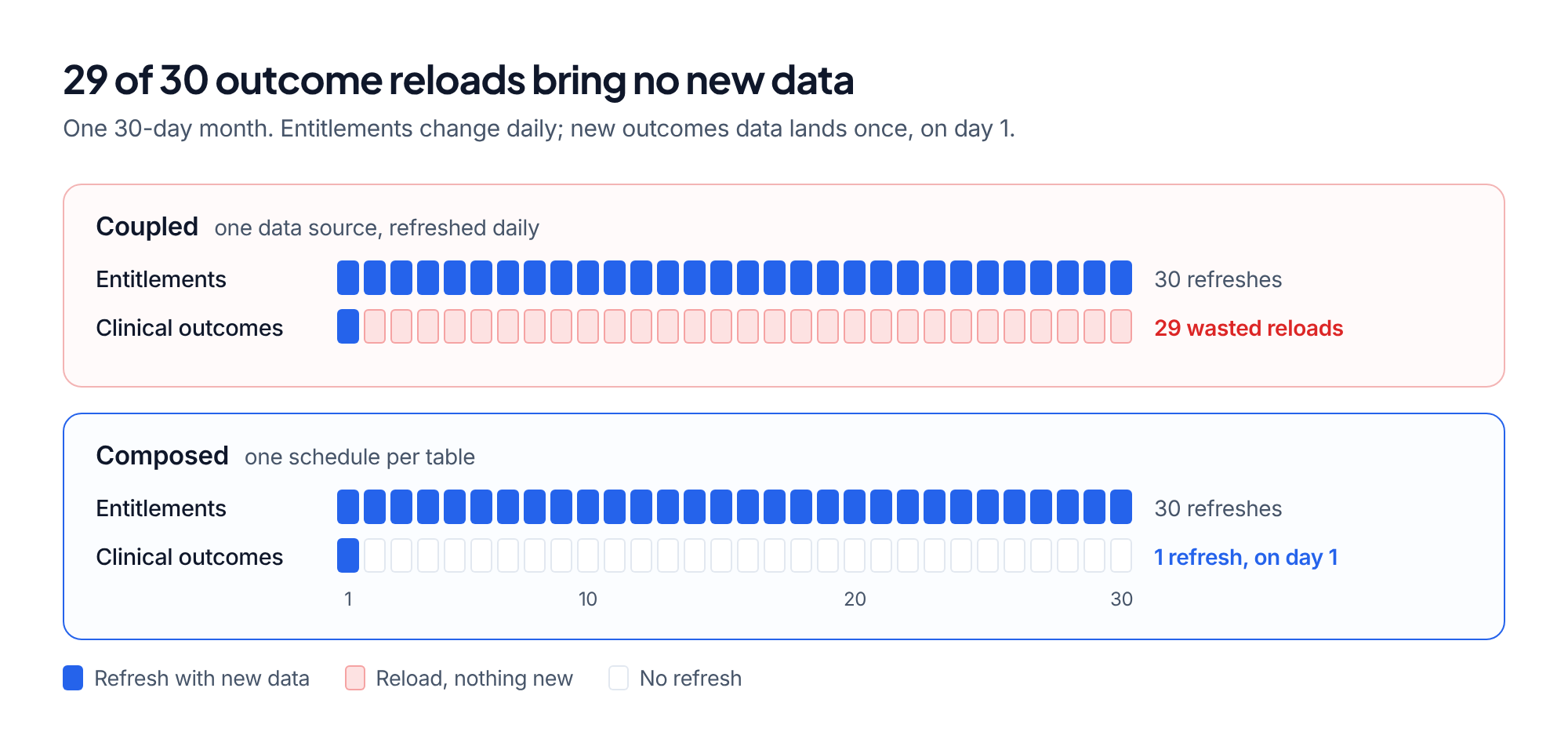
One schedule for everything vs. one schedule per table
The locked box. In a single relationship model, your entitlement table is locked inside that one data source. Nobody else can use it.
Using composable data sources avoids both:
-
Each table keeps its own refresh schedule.
-
The entitlement table is published for others to use.
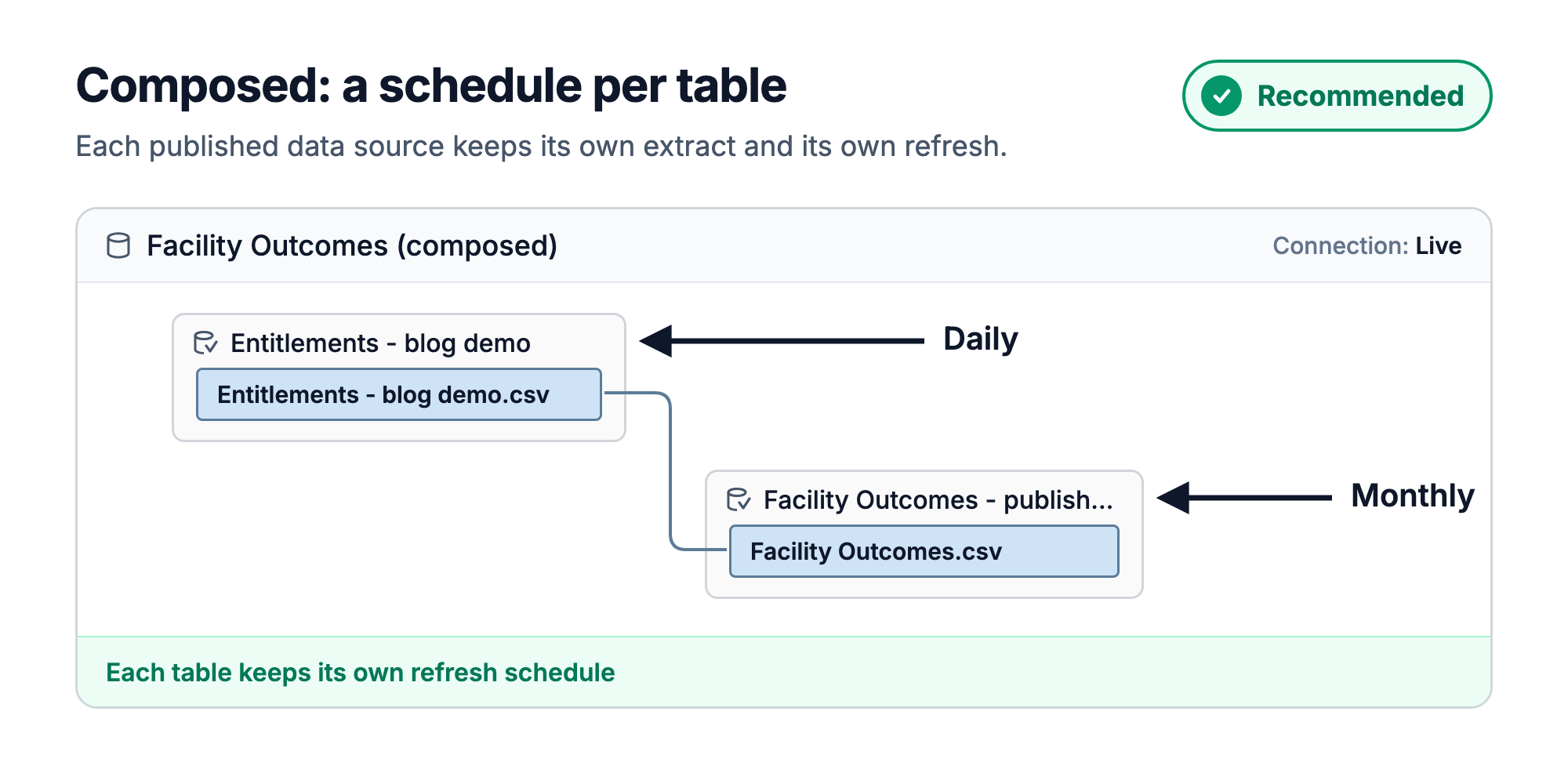
Composed: entitlements refresh daily, outcomes monthly.
One caveat: as of Tableau 2026.3.0, a bug can break a composed data source when the same workbook also has another composed data source or relationship model. I cover it at the end of this post.
When should you use it?
Should you apply row-level security to all of your dashboards? Absolutely not.
This is for when you need to lock data down. In healthcare, the most common reason is patient information. If your dashboard or workbook is available to a broad set of users and there's PHI on it, it should absolutely be locked down with row-level security, using a centralized, IT-governed entitlement table.
HIPAA's minimum necessary standard expects access to patient information to be limited to what each person needs to do their job. Row-level security is how a shared dashboard does that.
The trade-off: performance
The reason you don't apply it everywhere is that there's a trade-off. You're asking Tableau to do extra work on the fly: join your data to the entitlement table and filter it for whoever is signed in, on every query. Data source filters also limit what Tableau calls join culling, its trick for skipping joins a view doesn't need.
Your dashboard may load a little slower.
We've been applying RLS for a while now in Tableau and always see this performance drag. Great news is that we are on v1 for composable data sources and it is already better than the old methods. It's going to get better still.
A good entitlement table
The entitlement table is key.
Your filter is only ever as good as the table behind it. A good one is:
-
Centrally governed: owned and operated by IT, ideally, not a spreadsheet on someone's desktop.
-
Complete: every user who might open the dashboard is in it, because anyone missing sees nothing.
-
Updatable: access is added and removed through a ticket system.
-
Auditable: you can show who had access to what, and when it changed.
If your organization already has an IT-owned security table in its data warehouse, use it rather than building your own.
Remember to add the RLS Filter calculation before publishing it to Tableau Cloud, though.
Wrapping up
That's the crash course. Row-level security with composable data sources is:
-
Straightforward to apply: two published data sources, one relationship, one data source filter.
-
Easy on your refreshes: entitlements refresh daily, and outcomes only when new data lands.
-
Written once: the calculation lives in the published entitlement table. Publish the composed data source too, and the filter is set once as well.
-
Going to get better: it's version one, and it should only get faster.
-
Supportive of HIPAA compliance: it keeps each person to the patient data their job needs. It isn't compliance on its own, but it's a big part of doing it right.
If you give it a try, I'd love to hear how it goes. Feel free to tag and share with me.
Heads-up: a known bug in 2026.3.0
Before you roll this out, one callout.
At the time of writing (Tableau 2026.3.0), a composed data source can lose its link to the entitlement table when it shares a workbook with another data source that has a relationship of its own, whether that's a second composed data source or a relationship model.
Publishing looks fine. You only find out when you reopen the workbook. I found it while building the demo for this post and reported it to Tableau.
The devs working on composable data sources are already working on a fix. It might be fixed by the time you read this.
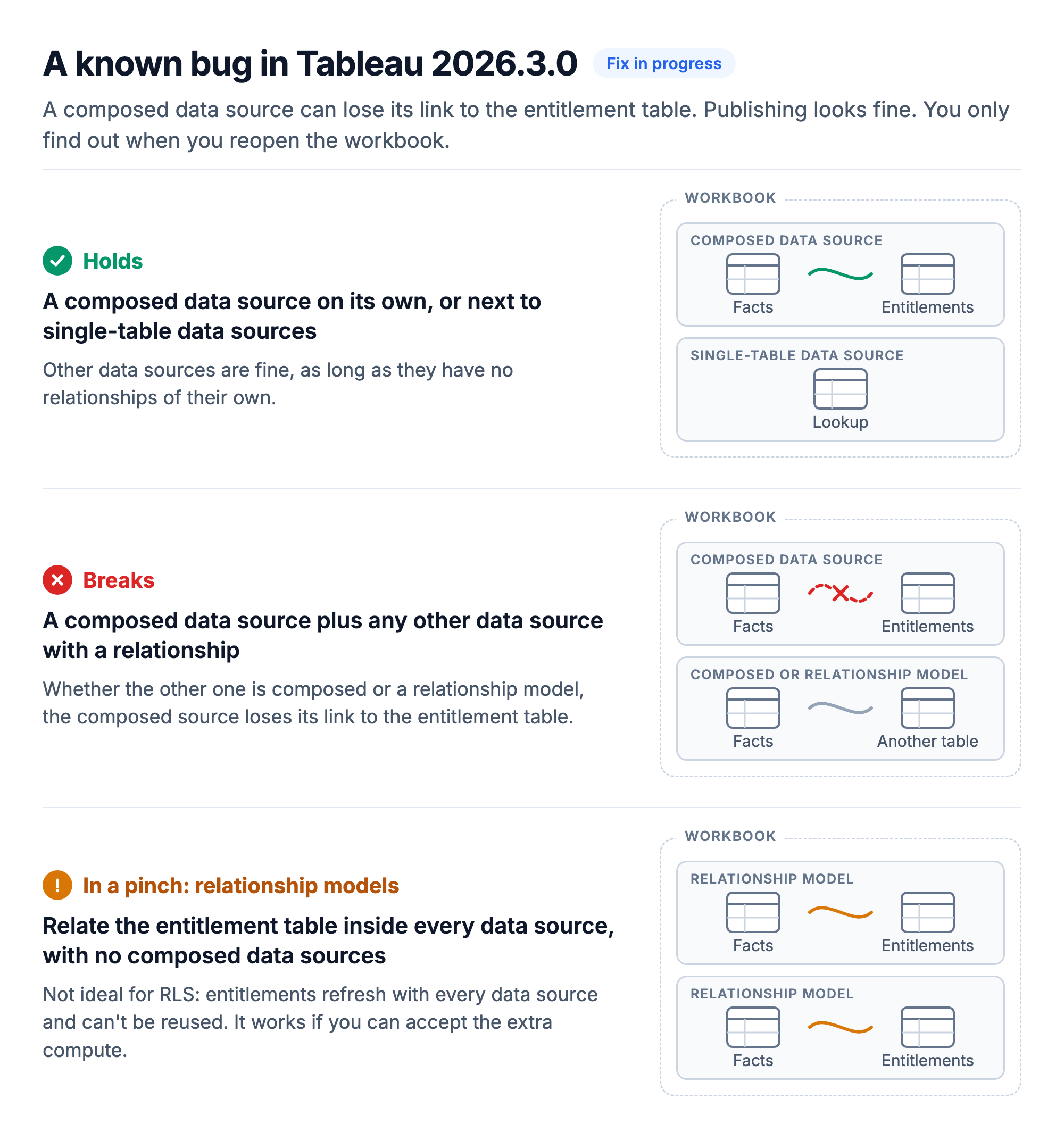
Tested in Tableau Desktop 2026.3.0 and in web editing on Tableau Cloud.
Until the fix lands:
-
Composed data source on its own, or next to single-table data sources? You're fine.
-
Need more than one data source with a relationship? In a pinch, use relationship models: relate the entitlement table inside every data source, and leave composition out of that workbook. I don't recommend it, for the refresh and reuse reasons above, but it works if you can accept the extra compute.
Resources
-
Composable Data Sources - Tableau Help
-
RLS Best Practices for Data Sources and Workbooks - Tableau Help
-
User Functions: USERNAME() and ISMEMBEROF() - Tableau Help
-
How Relationships Differ from Joins - Tableau Help
-
HIPAA Minimum Necessary Requirement - U.S. Department of Health and Human Services